
How to install APK, APKs and XAPK files?
- Jex
Table of Contents
Got a new game or tool from JEXAPK.COM and wondering how to get it running on your Android device? Side-loading applications outside the Play Store is straightforward once you know the basics. In this step-by-step guide, JEX APK will walk you through the entire installation process safely and effortlessly.
Before diving into the steps, it helps to know what kind of file you downloaded. Apps on JEX APK typically come in three standard formats: standard APK, split APKs, and resource-heavy XAPK packages. Here is a quick breakdown to help you pick the right installation method.
Demystifying Package Formats: APK, APKs, and XAPK
Android applications hosted outside official app stores come packaged in different ways depending on their size and structural needs.
What is a Standard APK File?
An APK (Android Package Kit) is the universal file type for Android. Think of it as a simple setup file for your phone. You tap it, confirm the installation, and you are ready to play—no extra tools required.
What are APKs (Split Packages)?
APKs files are dynamic App Bundles stored inside a single compressed folder. Because modern apps tailor themselves to specific device architectures (CPU type, screen resolution, language), APKs split these components to keep file sizes small. To install them, you need a utility tool like XAPK Installer.
What is an XAPK File?
An XAPK package bundles the main application code together with large asset files (known as OBB data). This format is widely used for graphic-intensive mobile games so that all graphic packages and expansion data download together in one go.
Step-by-Step Installation Instructions
Quick Tip: If your device blocks the setup, make sure to grant permission for “Unknown Sources” or briefly turn off Google Play Protect inside your Play Store settings.
Method 1: Direct APK Installation
Installing a standard .apk file takes just a few seconds:
1. Download your chosen .apk package from JEXAPK.COM.
2. Locate and open the file using your device’s file manager or download history.
3. Confirm the system prompt by tapping Install.
Method 2: Installing XAPK and APKs Bundles
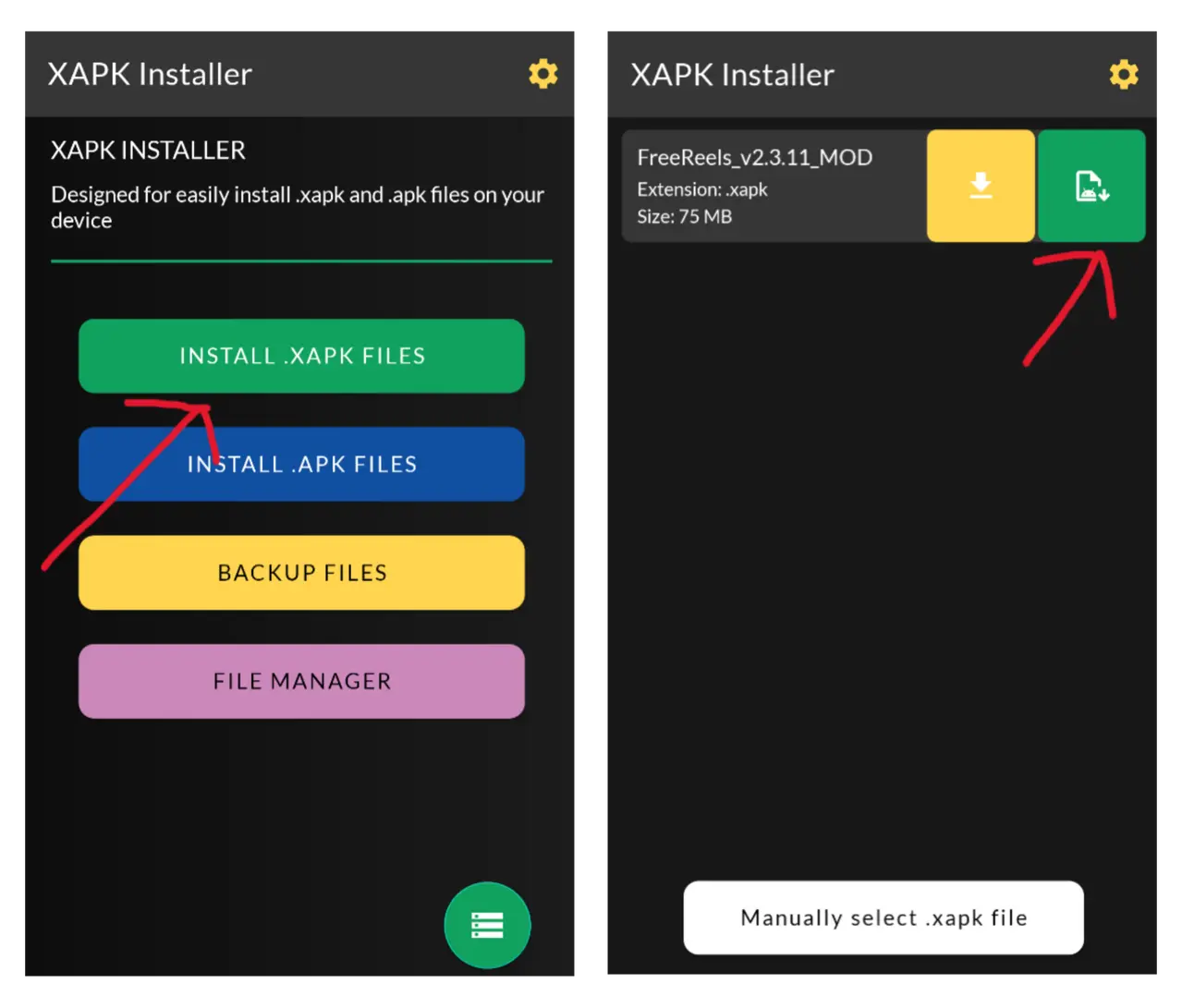
For bundled formats, you will need the specialized XAPK Installer application on your Android phone.
1. Launch XAPK Installer and grant storage access.
2. Browse through your storage to locate your downloaded .xapk or .apks file, then tap Select.
3. Let the installer automatically extract OBB files and build the package, then tap Install when prompted.
Troubleshooting Common Errors
Most installations finish smoothly. However, if you run into parse errors, missing OBB warnings, or blocked installations, check out our comprehensive guide on resolving common Android installation errors for instant solutions.
Conclusion
Setting up Android apps from JEXAPK.COM is quick and secure once you match the file type with the right installation step. Whether it is a simple APK or a massive XAPK game file, you are now ready to enjoy your favorite applications. Have questions or suggestions? Reach out to us via our About page. Happy gaming!
